Meta’s Muse Can Now Shop at Loblaw for Canadians
Loblaw becomes Muse’s first Canadian retail partner, bringing meal planning and grocery checkout as Meta rolls out voice in Canada.
WhatsApp is rolling out a major update for iPhone users that brings its very own cloud backup storage directly to the app. Spotted by WABetaInfo in the latest WhatsApp beta release for iOS, the new feature gives users a dedicated alternative to Apple’s iCloud for storing chat histories and media.
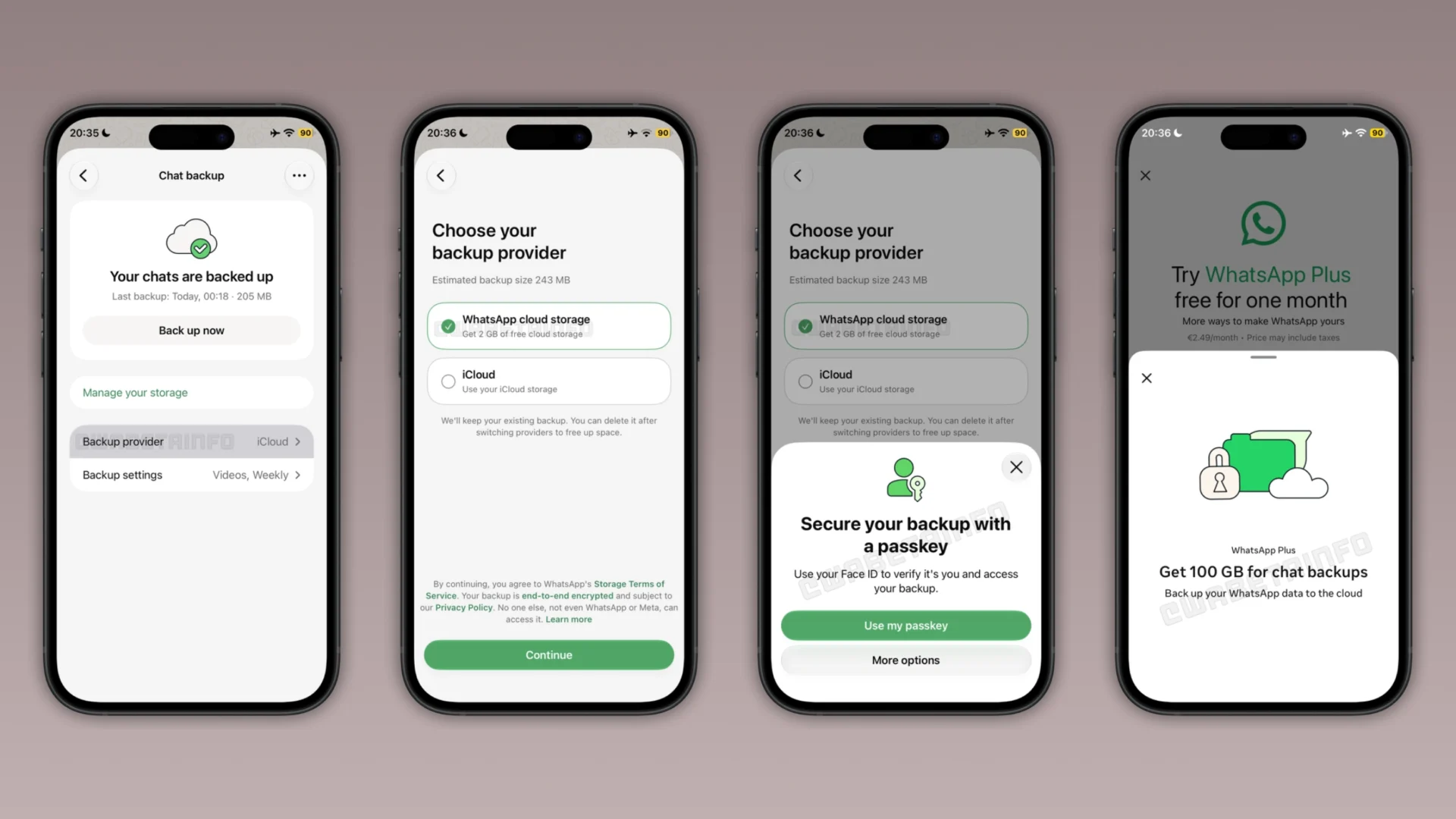
For years, iPhone users have relied exclusively on iCloud to back up their WhatsApp messages. However, Apple’s standard 5GB of free iCloud storage fills up remarkably fast because it has to accommodate device backups, photos, documents, and other app data all at once. Once that limit is reached, users are forced to either manually clean out files or pay for an iCloud+ subscription.
With the newly rolling out feature, WhatsApp is offering a separate storage space specifically for chat backups. Eligible beta testers who receive the update will find a new “Backup provider” option under the Chat Backup settings menu, allowing them to switch their backup destination from iCloud to WhatsApp’s own servers.
To help users test the functionality, WhatsApp is providing 2GB of free cloud storage. For individuals with larger chat archives or heavy media sharing habits, larger capacity tiers are also tied into broader subscription ecosystems. Subscribers to WhatsApp Plus reportedly get 100GB of storage included, while Meta One plans can scale up to 4TB depending on the chosen tier.
Unlike traditional iCloud backups where end-to-end encryption can sometimes be optional or managed separately, backups stored on WhatsApp’s dedicated servers require strict end-to-end encryption by default. Users cannot skip this setup step and must secure their data using either a passkey or a 64-digit encryption key.
If a subscription plan expires or isn’t renewed, WhatsApp retains the backup on its servers for four months before permanent deletion. Furthermore, these cloud backups do not currently support cross-platform restoration. Users switching from an iPhone to an Android device will still need to use WhatsApp’s built-in local chat transfer tool rather than restoring from the cloud.
Want to see more of our stories on Google?

P.S. Want to keep this site truly independent? Support us by buying us a beer, treating us to a coffee, or shopping through Amazon here. Links in this post are affiliate links, so we earn a tiny commission at no charge to you. Thanks for supporting independent Canadian media!